


Are you looking to boost your business and reach more customers online? Google AdWords can be your secret weapon.
It lets you place your ads right where people are searching for what you offer. Imagine your business popping up at the exact moment someone needs your product or service. You’ll discover how Google AdWords works, why it matters for your growth, and simple tips to get started without wasting money.
Ready to turn clicks into customers? Keep reading and unlock the power of Google AdWords for your success.
Google Ads Basics
Google Ads is a popular tool for online advertising. It helps businesses reach new customers fast. Understanding the basics makes it easier to start and run ads effectively. This section explains how Google Ads works, the types available, and how to set up an account.
How Google Ads Work
Google Ads shows your ads to people searching on Google. You choose keywords related to your product or service. When someone searches these keywords, your ad may appear. You pay only when someone clicks your ad. This system is called pay-per-click (PPC).
Google ranks ads by relevance and bid amount. Ads with higher relevance and bids show up more often. This helps connect ads with interested users. A well-written ad attracts clicks and potential customers.
Types Of Google Ads
Google Ads offers several types to fit different goals. Search ads appear on Google search results. Display ads show on websites in Google’s network. Video ads play before or during YouTube videos. Shopping ads show products with pictures and prices. Each type targets users in unique ways.
Choosing the right ad type depends on your business goals. Search ads work well for direct sales. Display ads build brand awareness. Video ads engage viewers with visuals and sound. Shopping ads help sell products online.
Setting Up Your Account
Creating a Google Ads account is simple. Start by visiting the Google Ads website. Sign in with your Google account or create a new one. Next, set your advertising goals and budget. Choose your target audience and location. Then, create your first campaign and ads.
Google Ads guides you through each step. Use clear and simple language for your ads. Monitor your campaign performance regularly. Adjust bids and keywords to improve results. A well-managed account saves money and increases success.
Keyword Research
Keyword research is the first step in creating a successful Google AdWords campaign. It helps you find the words and phrases people use to search for products or services like yours. Choosing the right keywords ensures your ads reach the right audience. This saves money and increases your chances of getting clicks and sales.
Finding High-intent Keywords
High-intent keywords show that a person is ready to take action. These keywords often include words like "buy," "near me," or "discount." Targeting these words can bring visitors who want to make a purchase soon. Focus on phrases that match what your business offers. This helps attract customers who are closer to making a decision.
Using Keyword Tools
Keyword tools help find words related to your business. Google’s Keyword Planner is one popular tool. It shows how many people search for certain terms each month. These tools suggest new keywords you might not think of. Use them to build a strong list of relevant keywords. This improves your ad’s reach and effectiveness.
Negative Keywords To Avoid Waste
Negative keywords prevent your ads from showing on irrelevant searches. For example, if you sell shoes, add "free" as a negative keyword. This stops your ad from appearing for people looking for free shoes. Using negative keywords saves your budget. It makes sure your ads appear only to the right people.
Creating Effective Ads
Creating effective ads is key to success with Google AdWords. Good ads attract clicks and bring the right visitors. They must be clear, relevant, and interesting. Small changes in ads can lead to big results.
Focus on clear messages that speak to what users want. Use tools and strategies to make ads stand out. Follow simple steps to improve ad performance and get more value from your budget.
Writing Compelling Ad Copy
Write short, clear sentences. Use words that match the searcher's intent. Highlight benefits, not just features. Include a call to action, like “Buy now” or “Learn more.” Use numbers or special offers to catch attention. Avoid jargon and complex words.
Using Ad Extensions
Ad extensions add extra info to your ads. They show phone numbers, location, links, and more. Extensions make ads bigger and more useful. They increase the chance that users will click. Use sitelink extensions to show more pages. Call extensions help mobile users call easily.
Designing Responsive Ads
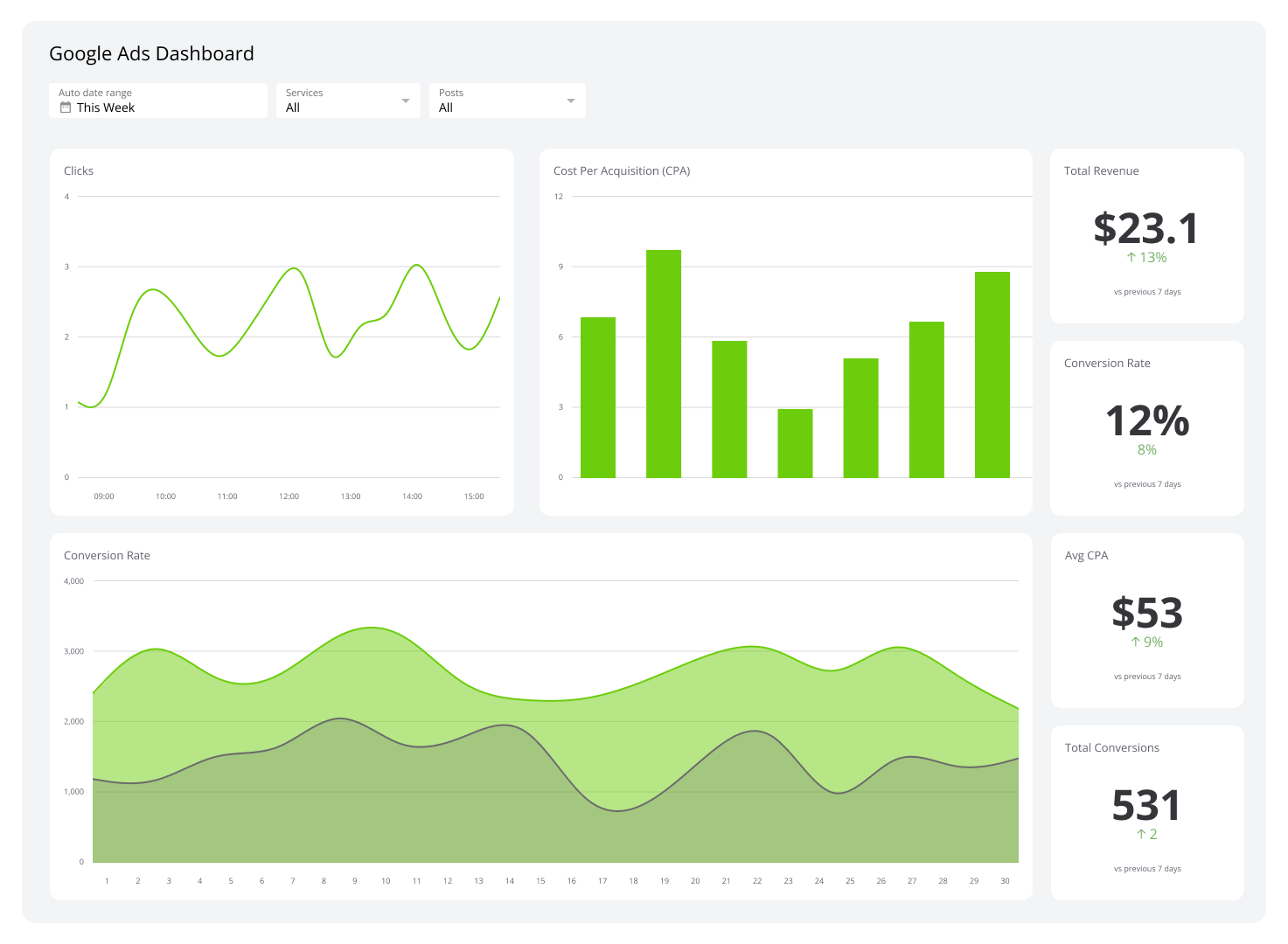
Responsive ads change size and format automatically. They fit different devices and screen sizes. Upload different headlines and images. Google tests combinations to find what works best. Responsive ads save time and reach more people. They improve ad visibility on all platforms.
Credit: www.klipfolio.com
Campaign Structuring
Campaign structuring is the foundation of a successful Google AdWords account. It helps organize your ads and keywords for better control and performance. A well-structured campaign improves targeting, tracking, and budget use.
Proper structuring makes it easier to test ads and measure results. It also allows quick changes without affecting the entire account. This saves time and reduces mistakes.
Organizing Campaigns And Ad Groups
Divide campaigns by products, services, or locations. Keep each campaign focused on one main goal.
Inside campaigns, create ad groups based on related keywords. This keeps ads relevant to what people search for. Relevant ads get higher quality scores and lower costs.
Budget Allocation Strategies
Assign budgets based on campaign goals and importance. Spend more on campaigns that bring better results.
Use daily budgets to control costs. Adjust budgets regularly based on performance data. Avoid spending too much on low-performing campaigns.
Choosing The Right Bidding Method
Pick a bidding method that fits your goal. Manual CPC gives control over bids. Automated bidding saves time and adjusts bids for better results.
For clicks, use Maximize Clicks. For conversions, choose Target CPA or Target ROAS. Test different methods to see what works best.
Optimizing For Roi
Optimizing for ROI in Google AdWords means getting the most value from every dollar spent. It focuses on increasing profit, not just clicks or views. Careful planning and constant adjustment help improve campaign results. Smart strategies lower waste and raise returns.
Tracking Conversions
Conversion tracking shows which ads bring sales or leads. It helps find the ads that work best. You can track purchases, sign-ups, or calls. This data guides smart decisions to boost profits. Without tracking, spending is just guessing.
A/b Testing Ads
A/B testing compares two versions of an ad to see which performs better. Test headlines, images, or calls to action. Small changes can lead to big improvements. Regular testing keeps ads fresh and effective. It helps find the message that connects with customers.
Adjusting Bids And Budgets
Adjust bids to focus on high-performing keywords. Increase bids on terms that bring more conversions. Lower bids on those that waste money. Shift budgets to campaigns that deliver the best results. This ensures money goes to the most profitable ads.
Credit: www.clickcease.com
Advanced Techniques
Advanced Google AdWords techniques help you get better results. These methods go beyond basic ad setup. They focus on reaching the right people and improving ad performance.
Using these strategies can lower costs and increase clicks. You will learn how to bring back visitors, target specific groups, and use automation tools.
Remarketing Campaigns
Remarketing shows ads to people who visited your website before. It reminds them about your products or services. This increases the chance they will return and buy.
Set up a remarketing list in Google Ads. Show ads only to visitors who did not complete a purchase. Use different ads for different groups. This keeps your message clear and relevant.
Using Audience Targeting
Audience targeting lets you reach specific groups based on their interests or behavior. Choose from options like demographics, interests, or website visitors.
This method helps you focus your budget on people most likely to buy. It reduces wasted ad spend and improves your return on investment.
Leveraging Automation And Scripts
Automation saves time and improves campaign management. Google Ads offers tools that adjust bids and budgets automatically. This keeps your campaigns efficient and effective.
Scripts allow custom changes in your account. Use them to pause low-performing ads or change bids quickly. This keeps your campaigns running smoothly without manual work.
Common Mistakes To Avoid
Many advertisers make mistakes with Google AdWords that waste money and reduce results. Avoiding common errors helps your ads perform better and reach the right audience. Focus on key areas that often cause problems.
Ignoring Quality Score
Quality Score affects your ad's position and cost per click. Low scores mean higher costs and fewer views. Check your keywords, ads, and landing pages for relevance. Improve ad text and make sure landing pages match ads closely. A good Quality Score saves money and improves results.
Overlooking Mobile Optimization
Most users browse on mobile devices. Ads that don’t work well on phones lose clicks and conversions. Use mobile-friendly landing pages and fast-loading sites. Test your ads on different devices. Mobile optimization boosts user experience and ad success.
Neglecting Regular Account Reviews
Google AdWords needs constant care. Check your campaigns weekly to find poor performers. Pause or adjust ads that don’t work. Update keywords and budgets based on data. Regular reviews keep your account healthy and effective.
Tools And Resources
Google Ads offers many tools and resources. These help advertisers manage and improve their campaigns. Using the right tools saves time and increases results. Learning platforms provide clear guidance for beginners and experts alike.
Google Ads Editor
Google Ads Editor is a free desktop app. It allows users to make bulk changes offline. Users can create, edit, and review campaigns easily. Changes can be uploaded quickly to Google Ads. This tool is perfect for managing large accounts.
Third-party Analytics Tools
Third-party tools help track and analyze campaign data. They offer insights beyond Google Ads reports. Tools like SEMrush and Ahrefs show keyword trends and competition. Others focus on user behavior and conversion tracking. These tools improve decision-making and campaign performance.
Learning And Support Platforms
Google provides many learning resources for advertisers. Google Skillshop offers free courses and certifications. The Google Ads Help Center answers common questions clearly. Forums and communities allow sharing tips and solving problems. These platforms build skills and confidence in advertising.
Credit: neilpatel.com
Frequently Asked Questions
What Is Google Adwords And How Does It Work?
Google Adwords is an online advertising platform by Google. It allows businesses to display ads on Google search and partner sites. Advertisers bid on keywords to show their ads to relevant audiences. Payment is usually based on clicks or impressions.
How Much Does Google Adwords Cost Per Click?
The cost per click (CPC) in Google Adwords varies by industry and competition. Average CPC ranges from $1 to $2, but some niches can cost more. Advertisers set daily budgets and bids to control spending effectively.
How Can I Optimize My Google Adwords Campaign?
Optimizing involves keyword research, ad copy testing, and targeting refinement. Use negative keywords to filter irrelevant traffic. Monitor performance regularly and adjust bids and budgets to improve ROI.
What Are The Benefits Of Using Google Adwords?
Google Adwords offers fast, measurable results with precise targeting. It increases brand visibility, drives traffic, and boosts sales. The platform provides detailed analytics to track campaign success and optimize strategies.
Conclusion
Google AdWords helps businesses reach more customers online. It allows precise targeting based on location, interests, and search terms. Ads appear when people search for products or services. This increases the chance to get clicks and sales. Managing campaigns takes some effort but brings good results.
Start small, track your progress, and adjust your ads often. With patience and care, Google AdWords can support your business growth. Try it and see how it works for you.





