


Have you ever wondered how to unlock powerful insights from your website traffic? Google Ana is the tool that can transform the way you understand your online audience.
Imagine having clear data at your fingertips to boost your business, improve your content, and attract more visitors. This article will show you exactly how to use Google Ana to get ahead. Ready to turn your website into a growth machine?
Keep reading, and you’ll discover simple steps to make it happen.
Google Analytics Basics
Google Analytics is a free tool that helps you understand your website visitors. It shows who visits, what they do, and how they interact with your site. Learning the basics lets you make smart decisions to improve your website. This section covers the essential steps to get started and what to watch for in your data.
Setting Up Your Account
Start by creating a Google Analytics account. Use your Google email to sign up. Next, add your website as a property in the account. Google will give you a tracking code. Place this code on every page of your website. This step is crucial to collect visitor data. Wait a few hours for data to start appearing.
Navigating The Dashboard
The dashboard is the main place to see your website data. It has different sections like real-time users, audience, and behavior. Each section shows specific information about your visitors. Use the left menu to explore reports. The dashboard is easy to customize. Add widgets to see what matters most.
Key Metrics To Track
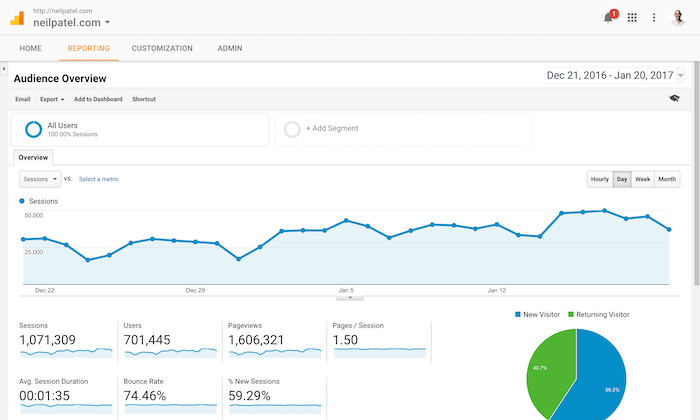
Focus on metrics like sessions, users, and pageviews. Sessions show how many visits your site gets. Users tell you the number of unique visitors. Pageviews count how many pages people see. Watch the bounce rate to know if visitors leave quickly. Track average session duration to see engagement. These metrics help you understand visitor behavior and improve your site.

Credit: www.smartlook.com
Tracking Website Traffic
Tracking website traffic is essential for understanding how visitors interact with your site. It helps you see where your visitors come from and what they do on your pages. This data guides you in making smart decisions to improve your site’s performance.
Understanding Traffic Sources
Traffic sources show how visitors find your website. It could be from search engines, social media, direct visits, or referrals from other sites. Knowing these sources helps focus your marketing efforts. You can invest more in channels that bring the most visitors.
Analyzing User Behavior
User behavior reveals what visitors do after landing on your site. It tracks pages they visit, time spent, and actions taken. This information highlights what interests your audience. It also shows where visitors leave, helping to fix weak points.
Identifying Top Performing Pages
Top performing pages attract the most visitors and keep them engaged. These pages often drive conversions and sales. By finding these pages, you can create similar content. This strategy helps increase your website’s overall success.
Using Goals And Conversions
Using goals and conversions in Google Analytics helps track important actions on your website. These actions show how well your site meets business needs. Goals measure specific user activities like signing up or buying. Conversions track the completion of these goals. Together, they give insight into user behavior and website success.
Setting Up Goals
Start by choosing the right goals for your site. Goals can track page views, time spent, or events like downloads. In Google Analytics, go to the Admin panel and find the Goals section. Click “New Goal” and pick a template or create a custom goal. Enter details like goal name and type. Finally, set the goal conditions and save it. Test to make sure it works correctly.
Measuring Conversion Rates
Conversion rate shows the percentage of visitors who complete a goal. This metric helps understand user engagement and success. Check conversion rates in the Google Analytics reports under Conversions. Compare rates over time to spot trends or issues. Low conversion rates may indicate problems with your site or marketing. High rates mean your site meets visitor needs well.
Optimizing Funnels
Funnels show the steps users take to complete a goal. Use funnel reports to find where users drop off. Identify pages or steps with high exit rates. Simplify or improve these areas to keep users moving forward. Testing different page designs or calls to action helps increase conversions. Regularly review funnels to keep your site effective and user-friendly.
Audience Insights
Audience insights are key to understanding who visits your website. Google Analytics provides detailed data that helps reveal your audience’s traits and habits. These insights guide you to create better content and improve user experience. Below are important aspects of audience insights you can explore.
Demographic Data
Demographic data shows the age, gender, and interests of your visitors. This information helps tailor your content to fit their needs. For example, knowing the age group lets you choose the right tone and topics. Gender data helps in creating targeted marketing campaigns. Interest categories guide you to explore new content ideas.
Device And Location Analysis
Device data reveals if users visit from mobile, desktop, or tablet. This helps optimize your site for different screens. Location analysis shows where your visitors come from. Knowing their country or city helps customize your content. It also aids in planning local promotions or events. Device and location insights improve user experience and marketing strategies.
Behavior Flow
Behavior flow tracks how visitors move through your website. It shows the pages they visit first and where they go next. This helps identify popular content and any drop-off points. Understanding behavior flow helps improve navigation and keep users engaged. You can fix issues that cause visitors to leave early.
Improving Traffic With Reports
Reports in Google Analytics help you understand your website traffic better. They show details about visitors, pages, and actions on your site. Using these insights, you can improve your content and attract more visitors.
Reports guide you in making smart decisions. They tell what works and what needs change. This way, you can focus on strategies that bring real results.
Custom Reports
Custom reports let you choose the data you want to see. You can pick specific metrics and dimensions. This helps you track goals that matter most to your site.
For example, you can create a report showing traffic from social media only. Or find pages with the highest bounce rates. These reports make it easy to spot trends and fix problems fast.
Real-time Data
Real-time data shows what visitors do on your site right now. This helps you watch the impact of new posts or campaigns immediately.
You can see how many people are online, their location, and which pages they visit. Use this info to adjust your content or promotions quickly for better results.
Scheduled Email Reports
Scheduled email reports deliver your chosen data straight to your inbox. Set these reports to arrive daily, weekly, or monthly.
They save time and keep you updated without logging into Google Analytics. Regular reports help you track progress and spot issues early. This keeps your traffic growing steadily.
Credit: www.klipfolio.com
Integrating Google Analytics With Other Tools
Integrating Google Analytics with other tools helps you get more from your data. It connects different sources, giving a clearer view of your website’s performance. This allows better decision-making and improves marketing results.
Combining Google Analytics with various platforms lets you track user actions better. It also helps you see the impact of your ads and SEO efforts. Using these integrations saves time and increases accuracy in reporting.
Google Ads
Linking Google Analytics with Google Ads shows how ads drive traffic. You can see which ads bring visitors who buy or sign up. This helps adjust ad spending for better results. Tracking conversions becomes easier and more detailed.
Search Console
Connecting Google Analytics with Search Console gives insights into search queries. You learn which keywords bring users to your site. It shows how your site appears in search results. This data helps improve SEO and attract more visitors.
Third-party Plugins
Many third-party plugins work with Google Analytics to extend features. These tools can track e-commerce, forms, or social media interactions. They help gather more detailed data for analysis. Plugins simplify managing multiple data sources in one place.
Common Mistakes To Avoid
Google Analytics is a powerful tool. Many users make simple mistakes that hurt their data quality. These errors lead to wrong decisions. Avoiding common mistakes helps get clearer insights. This section covers frequent errors to watch out for.
Incorrect Tracking Setup
Setting up tracking incorrectly is a major error. Some users forget to add the tracking code on all pages. This causes missing data. Others install the code twice, which creates duplicate hits. It is important to test the setup after installation. Use Google Tag Assistant or real-time reports to check if data flows correctly.
Ignoring Mobile Traffic
Mobile visitors often make up a large share of traffic. Ignoring this segment means missing key user behaviors. Many sites do not track mobile apps or mobile web properly. This creates an incomplete picture of audience activity. Ensure mobile devices and apps are tracked separately for better analysis.
Overlooking Data Segmentation
Data segmentation breaks down audience into useful groups. Many users look only at overall numbers. This hides important differences within traffic. Segmenting by device, location, or behavior reveals trends and problems. Use segments to understand how different visitors interact with your site.
Credit: neilpatel.com
Advanced Tips To Boost Traffic
Boosting website traffic needs smart use of Google Analytics tools. Basic reports show data, but advanced features offer deeper insights. These tips help you track user actions, tailor data to your needs, and get quick answers. Use these methods to improve your site and attract more visitors.
Event Tracking
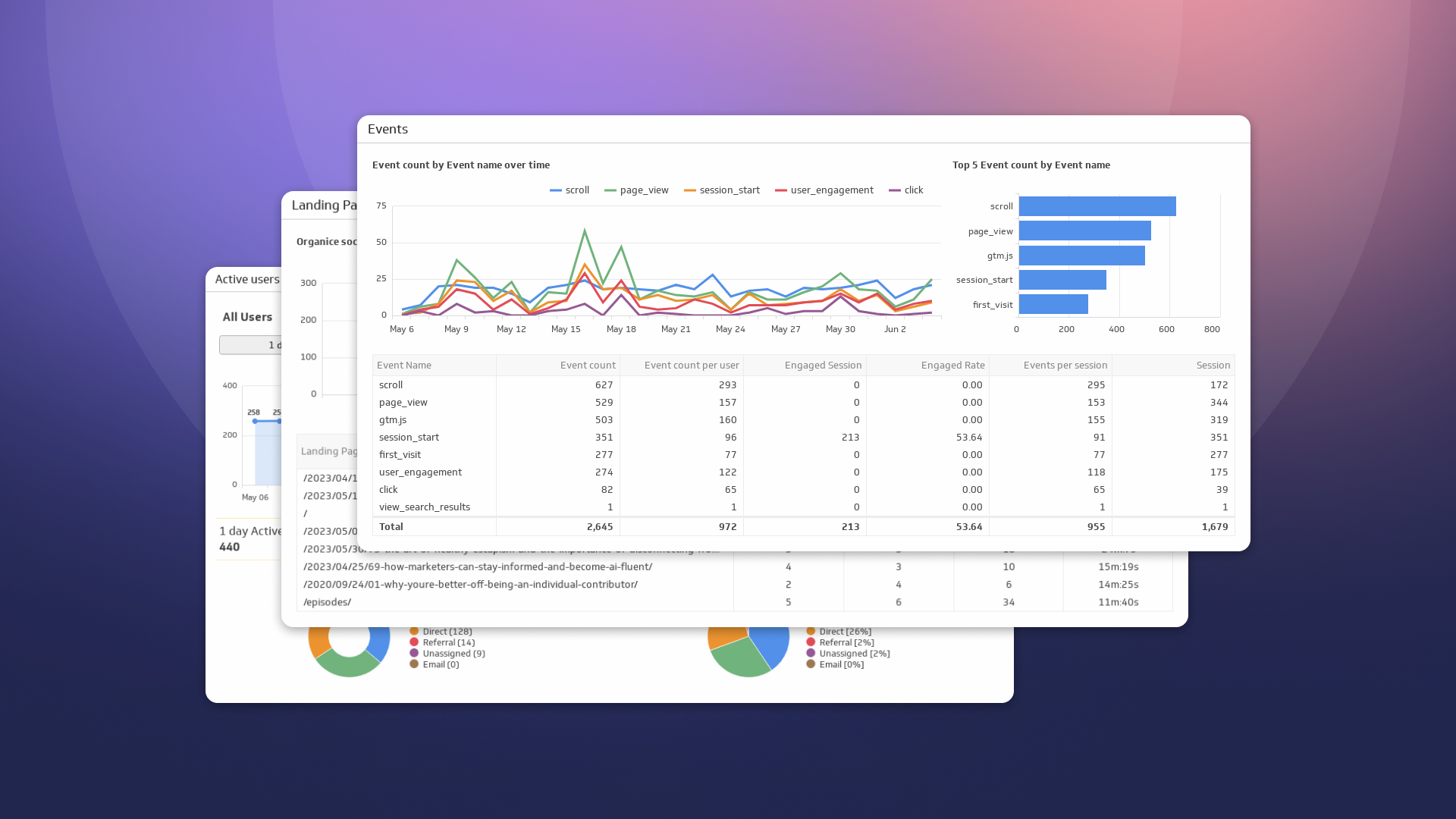
Event Tracking records specific user actions on your site. You can track clicks, video plays, downloads, and form submissions. This data reveals what users do beyond page views. Set up events to see which elements engage visitors most. Use this info to improve user experience and content.
Custom Dimensions And Metrics
Custom Dimensions and Metrics let you collect data that standard reports miss. For example, track user types or product categories. This helps understand different audience segments. Create reports with this custom data to spot trends and patterns. Tailor your marketing and content strategies based on real user behavior.
Using Analytics Intelligence
Analytics Intelligence answers your questions quickly. Ask simple queries about traffic, user behavior, or conversion rates. It gives instant reports and insights. This tool saves time and helps spot issues fast. Use it to make data-driven decisions without deep analysis skills.
Frequently Asked Questions
What Is Google Ana And Its Main Purpose?
Google Ana is a data analysis tool designed for marketers. It helps track website traffic, user behavior, and campaign performance effectively.
How Does Google Ana Improve Digital Marketing?
Google Ana provides insights into audience behavior. It enables marketers to optimize campaigns and increase return on investment.
Is Google Ana Suitable For Beginners?
Yes, Google Ana offers an intuitive interface. Beginners can easily learn to track and analyze data with tutorials and support.
Can Google Ana Integrate With Other Tools?
Google Ana integrates seamlessly with Google Ads, Search Console, and third-party platforms. This boosts data accuracy and reporting efficiency.
Conclusion
Google Ana offers useful tools to track website performance. It helps you understand visitor behavior clearly. Use its insights to improve your site’s content and design. Regular checks keep your strategy up to date. Simple steps lead to better online results.
Start exploring Google Ana and see the difference yourself.





