


Are you curious about how visitors find your website and what they do once they arrive? Understanding these details can unlock powerful insights to grow your online presence.
That’s where Google Analytics comes in. This free tool gives you a clear picture of your website’s traffic, user behavior, and much more. By learning how to use it effectively, you can make smarter decisions that boost your results. Keep reading to discover how Google Analytics can transform your approach and help you get the most from your website.
Setting Up Google Analytics
Setting up Google Analytics is the first step to understanding your website's visitors. It helps you track user behavior and measure your site's success. Proper setup ensures accurate data collection and better insights.
Creating An Account
Start by visiting the Google Analytics website. Use your Google account to sign in or create a new one. Next, click on "Create Account" and enter your website details. Choose the right industry category and reporting time zone. Finally, accept the terms of service to complete the setup.
Installing Tracking Code
After creating your account, Google Analytics provides a tracking code. This code must be added to every page of your website. Copy the code and paste it into the header section of your site's HTML. This step allows Google Analytics to collect data from your visitors. Use plugins if you run a CMS like WordPress for easier installation.
Configuring Goals And Events
Goals help measure specific actions users take on your site. Examples include form submissions or purchases. Set goals in the Google Analytics dashboard under "Admin." Events track interactions like button clicks or video plays. Define events using code or plugins to gather detailed user activity data. Proper configuration helps understand user engagement better.
Navigating The Dashboard
The Google Analytics dashboard is the control center for your website data. It shows all the important information in one place. Understanding the dashboard helps you make smarter decisions. It lets you track visitors, see traffic sources, and measure goals.
The dashboard is easy to use. You can explore different sections to find the data you need. It updates regularly, so you always see the latest numbers. Learning to navigate the dashboard saves time and improves your website’s performance.
Key Metrics To Monitor
Focus on key metrics that show how users interact with your site. Look at sessions to count visits. Check bounce rate to see if visitors leave quickly. Track average session duration to know how long people stay. Monitor page views for popular content. Watch conversion rates to measure success.
Customizing Reports
Custom reports help you see the data that matters most. Choose metrics and dimensions that fit your goals. Save reports to check trends over time. Filter data to focus on specific groups or behaviors. Customizing reports gives clear insights for better decisions.
Using Real-time Data
Real-time data shows what happens on your site at the moment. Watch active users to see current traffic. Track which pages visitors view now. Spot sudden spikes or drops in activity. Real-time data helps you react quickly to changes or issues.
Analyzing Audience Behavior
Understanding audience behavior helps improve your website's performance. Google Analytics offers clear insights into how visitors interact with your site. This knowledge guides better marketing and content decisions. You can see who visits, what they like, and how they navigate your pages.
Demographics And Interests
Google Analytics shows visitor age, gender, and interests. This data reveals your main audience groups. You can tailor content to match their preferences. Knowing what interests your visitors helps create relevant offers.
User Flow Visualization
User flow maps show the path visitors take on your site. You see where they start and where they leave. This helps find pages that need improvement. Fixing these pages can keep visitors longer.
Device And Location Insights
Analytics reports the devices visitors use, like phones or desktops. You learn if your site works well on all devices. Location data shows where visitors come from globally. This helps target specific regions with your content.
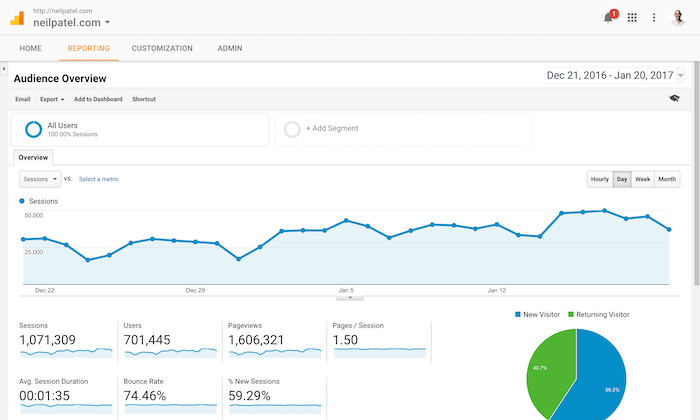
Credit: neilpatel.com
Tracking Traffic Sources
Tracking traffic sources helps you understand where your website visitors come from. This information guides your marketing efforts and improves your site’s performance. Google Analytics offers detailed reports on traffic sources. You can see which channels bring the most visitors and which ones need more work.
Knowing your traffic sources helps allocate your budget wisely. You can focus on channels that deliver the best results. Tracking also reveals visitor behavior from different sources. This insight allows you to tailor content and offers effectively.
Organic Vs Paid Traffic
Organic traffic comes from search engines without paid ads. Visitors find your site by typing keywords or clicking on free listings. Paid traffic arrives through ads you pay for. These include Google Ads, social media ads, and other promotions.
Organic traffic is usually more cost-effective over time. Paid traffic can bring quick results and target specific audiences. Comparing these two helps balance your marketing strategy. You can decide how much to invest in ads versus SEO.
Referral Traffic Analysis
Referral traffic comes from other websites linking to your site. It shows which sites send visitors your way. Tracking referrals helps find strong partnerships and new audience sources.
High referral traffic means other sites trust your content. Low referral traffic may indicate a need for outreach or better link-building. Use Google Analytics to see which links perform best. Focus on building relationships with those sites for steady traffic.
Social Media Impact
Social media platforms drive a large portion of web traffic. Google Analytics tracks visitors from Facebook, Twitter, Instagram, and others. It shows how well your social posts attract visitors.
Social traffic tends to be more engaged and interactive. Tracking these visitors helps measure the success of campaigns. You can adjust your posts to increase clicks and shares. Social media data helps improve your overall marketing plan.
Improving Content Performance
Improving content performance is key to growing your website. Google Analytics helps you understand which parts of your content work well. It also shows where visitors lose interest. Use this data to make smart changes. Small improvements can lead to better results over time.
Top Performing Pages
Google Analytics shows your best pages by traffic and engagement. These pages attract most visitors and keep them longer. Focus on these pages to learn what your audience likes. Use similar formats and topics for new content. This helps maintain steady visitor interest.
Bounce Rate Reduction
Bounce rate measures visitors who leave quickly. A high bounce rate means visitors don’t find what they want. Check which pages have high bounce rates. Improve them by adding clearer information or better links. This keeps visitors exploring your site longer.
Enhancing User Engagement
Engaged users spend more time on your site and interact with content. Google Analytics tracks clicks, scrolls, and time spent on pages. Use this data to find what draws attention. Add videos, images, or questions to keep users interested. Engaged visitors are more likely to return.
Optimizing Conversion Rates
Optimizing conversion rates is key to improving your website’s success. It means getting more visitors to complete desired actions. These actions could be buying a product, signing up, or contacting you. Google Analytics offers tools to track and boost these rates. Understanding how users move through your site helps you make smart changes. Let’s explore simple ways to optimize conversions effectively.
Setting Up Funnels
Funnels show the steps visitors take before converting. Set up funnels in Google Analytics to track each stage. This helps you spot where people leave your site. Fixing these drop-off points can increase conversions. Funnels simplify complex user journeys into clear paths. You see which pages or actions need improvement.
Analyzing Conversion Paths
Conversion paths reveal how visitors reach conversion points. Analyze these paths to understand user behavior. Look for common routes that lead to sales or sign-ups. Also, find less obvious paths that contribute to conversions. Use this data to optimize navigation and content. It helps guide users smoothly toward your goals.
A/b Testing Strategies
A/B testing compares two versions of a webpage or element. Use Google Analytics to measure which version works better. Test headlines, buttons, images, or layouts. Small changes can have a big impact on conversions. Run tests with clear goals and enough traffic. This method reduces guesswork and improves results steadily.
Advanced Tips And Tools
Advanced tools in Google Analytics help you get more from your data. These tips improve how you track, analyze, and act on your website’s traffic. Use these techniques to understand your visitors better and make smarter decisions quickly.
Integrating Google Ads
Link Google Ads with Google Analytics to see ad performance clearly. This connection shows which ads bring the most visitors and sales. You can check visitor behavior after clicking ads. Adjust your ad budget based on real data, not guesses.
Using Segments For Deeper Analysis
Segments divide your data into smaller groups for detailed study. Focus on new visitors, returning users, or buyers. Compare segments to find trends and patterns. This helps you tailor marketing and improve user experience.
Automating Reports And Alerts
Set up automatic reports to save time. Choose key metrics and get reports emailed to you regularly. Create alerts for sudden changes in traffic or goals. This keeps you informed without daily manual checks.

Credit: www.shopify.com
Credit: freshmango.com
Frequently Asked Questions
What Is Google Analytics Used For?
Google Analytics tracks website traffic and user behavior. It helps analyze visitor data to improve marketing strategies and user experience. Businesses use it to measure website performance and understand audience engagement effectively.
How Do I Set Up Google Analytics?
To set up, create a Google Analytics account and add your website. Install the tracking code on your site’s pages. Verify data collection to start monitoring visitor activity and website metrics instantly.
Can Google Analytics Track Mobile App Data?
Yes, Google Analytics tracks mobile app data. It provides insights on user interactions, session duration, and app performance. This helps optimize app design and marketing efforts to boost user engagement.
Is Google Analytics Free To Use?
Google Analytics offers a free version with robust features suitable for most websites. For advanced needs, Google Analytics 360 provides premium services at a cost. The free version is ideal for small to medium businesses.
Conclusion
Google Analytics helps you understand your website visitors better. It shows which pages they like and where they come from. You can track how users behave and what they search for. Using this data, you can improve your site’s performance step by step.
It is a tool that supports smart decisions. Start using it to see clear results in your online work. Simple, helpful, and effective for everyone who wants to grow online.





