


Are you struggling to understand how visitors interact with your website? Analytics De Google can be the key to unlocking powerful insights about your audience.
Imagine knowing exactly which pages keep your visitors hooked and which ones need improvement. This tool gives you clear, easy-to-read data that helps you make smart decisions to grow your business. Keep reading to discover how Analytics De Google can transform your online presence and boost your success.
Credit: neilpatel.com
Google Analytics Basics
Google Analytics is a powerful tool for understanding website traffic. It shows who visits your site and what they do there. Learning the basics helps you make better decisions to improve your site.
Start with setting up your account, then explore the dashboard. Finally, focus on key metrics that matter most for your goals.
Setting Up Your Account
Create a Google Analytics account using your Google email. Add your website as a property inside the account. You will get a tracking code to install on your site. This code collects data about visitors and sends it to Google Analytics.
Make sure the tracking code is placed on every page. This step ensures complete data collection.
Navigating The Dashboard
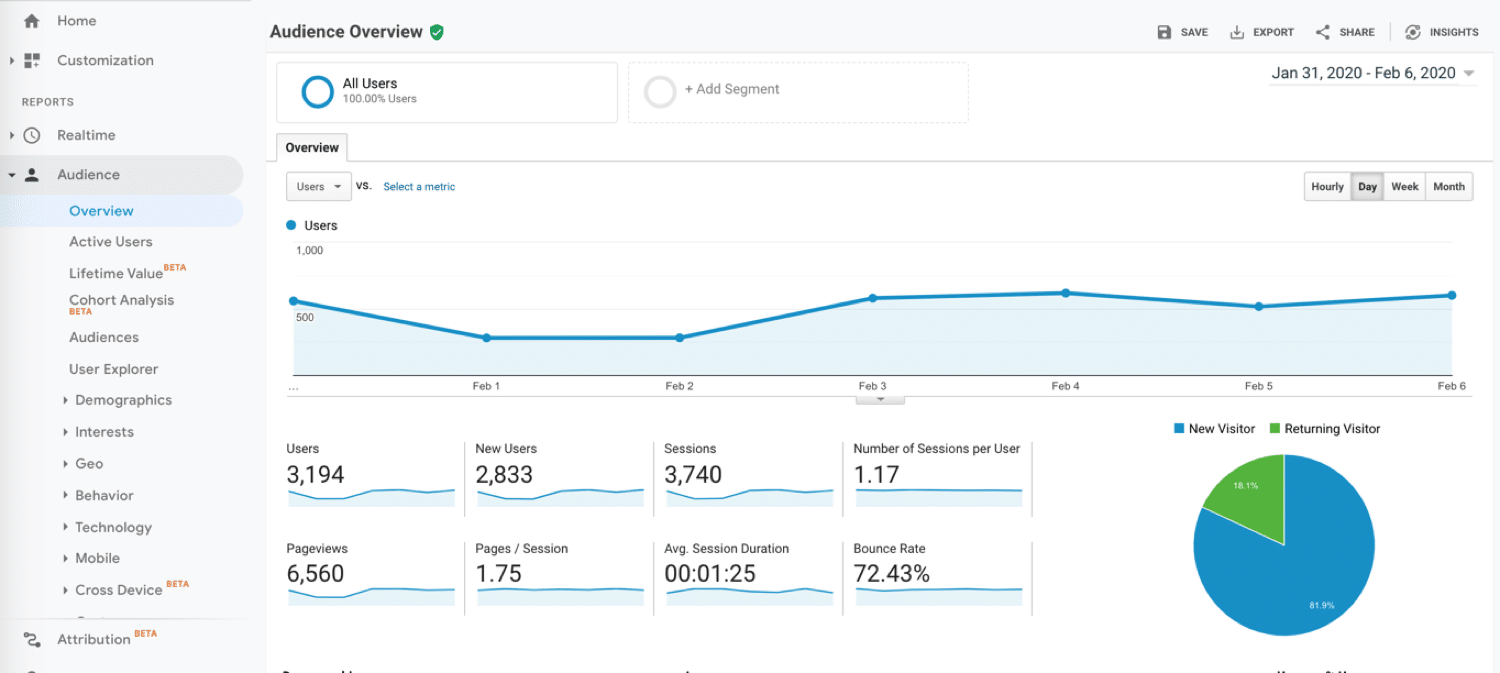
The dashboard is your main control center. It shows an overview of website activity. You can see real-time users, audience details, and traffic sources here.
Use the left menu to access reports like Behavior, Acquisition, and Conversions. Each section gives different insights about your visitors and their actions.
Key Metrics To Track
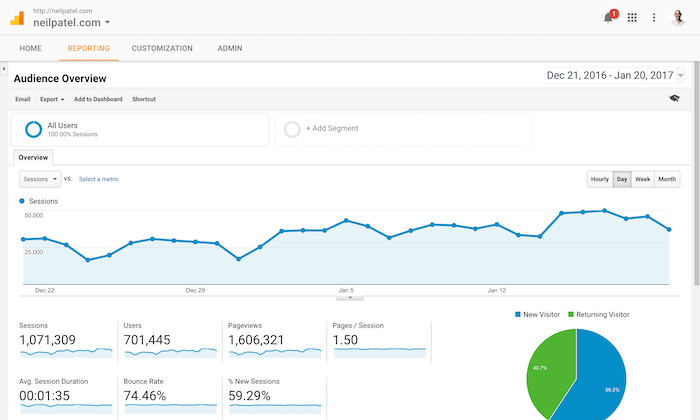
Focus on metrics like sessions, users, and bounce rate. Sessions show the total visits. Users count unique visitors. Bounce rate tells you how many leave after viewing one page.
Other important metrics include average session duration and page views. These help understand visitor engagement and popular content.
Data Collection Methods
Google Analytics collects data to help website owners understand visitor behavior. It uses several methods to gather information from different sources. These methods work together to provide a full picture of website traffic and user actions.
Using Tracking Codes
Tracking codes are small pieces of JavaScript added to website pages. They collect data on page views, clicks, and user interactions. Each time a visitor loads a page, the code sends information to Google Analytics.
This method captures details like session duration, bounce rates, and traffic sources. It is the most common and reliable way to track website activity.
Integrating With Other Tools
Google Analytics connects with various marketing and data tools. Integration allows sharing data between platforms for deeper analysis.
Tools like Google Ads and Search Console link user behavior with advertising and search performance. This helps marketers see which campaigns drive traffic and conversions.
Mobile And App Tracking
Mobile apps use Google Analytics SDKs to collect user data. These SDKs track app screens, events, and user engagement.
It helps app developers understand how users navigate and interact. This method works across Android and iOS platforms.
Analyzing Audience Behavior
Understanding your audience is key to improving your website. Google Analytics helps you analyze how visitors behave. This insight guides better decisions for your content and marketing. It reveals who visits, what they like, and how they interact.
Demographics And Interests
Google Analytics shows visitor age, gender, and location. It also reveals their interests based on browsing habits. This data helps tailor content to match visitor preferences. Knowing your audience’s profile improves user experience and engagement.
User Flow And Engagement
User flow tracks the path visitors take on your site. It shows which pages they visit first and where they leave. Engagement metrics reveal time spent and actions taken. This information identifies popular content and points of drop-off.
Segmenting Your Audience
Segmenting divides visitors into groups with shared traits. You can separate new and returning users or by device type. Segments allow targeted analysis and personalized marketing efforts. This approach leads to more effective communication and better results.
Measuring Traffic Sources
Measuring traffic sources is key to understanding where visitors come from. It helps identify which channels bring the most users. This knowledge allows better decisions to improve website performance. Google Analytics offers detailed reports on traffic sources. These insights show the split between organic, paid, referral, and social traffic. Marketers can track campaign success with UTM parameters. Let’s explore how to analyze these traffic sources effectively.
Organic Vs Paid Traffic
Organic traffic comes from search engines without payment. It shows users finding your site naturally. Paid traffic comes from ads you pay for. Both types have different impacts on your business. Organic traffic often brings steady, long-term visitors. Paid traffic can increase visits quickly but costs money. Google Analytics helps compare these traffic types. You can see which drives more conversions or engagement. This data guides budget and SEO efforts.
Referral And Social Media Insights
Referral traffic comes from other websites linking to yours. It shows which sites send visitors your way. Social media traffic comes from platforms like Facebook or Twitter. These channels often have engaged and active users. Google Analytics tracks referrals and social visits clearly. You can measure which social networks perform best. Tracking referrals helps build partnerships with other sites. These insights help focus marketing efforts on valuable sources.
Campaign Tracking With Utm
UTM parameters are tags added to URLs. They help track specific campaigns in Google Analytics. These tags show which ads or posts bring traffic. Marketers use UTM to measure email, social, or paid campaigns. Tracking campaigns this way shows which messages work best. It also helps understand visitor behavior from different sources. Using UTM codes improves campaign analysis and reporting.
Conversion Tracking
Conversion tracking is a key feature of Google Analytics. It helps you see how visitors complete actions on your site. These actions could be purchases, sign-ups, or downloads. Tracking conversions shows what works and what needs change. It gives clear data to improve your marketing efforts and website performance.
Setting Up Goals
Goals in Google Analytics define the actions you want visitors to take. You can set goals for page visits, time spent, or events like clicks. Setting up goals allows you to track how many users complete these actions. This tracking helps measure your website's success and user engagement. Goals are easy to create and customize in your Analytics account.
E-commerce Tracking
E-commerce tracking focuses on online sales. It tracks product performance, revenue, and transaction details. This feature helps online stores understand customer buying behavior. You can see which products sell best and the average order value. Setting up e-commerce tracking requires adding specific code to your website. The data it provides supports better sales and marketing decisions.
Funnel Visualization
Funnel visualization maps the steps users take before completing a goal. It shows where users drop off in the process. This tool helps find problems in the sales or signup process. You can see which steps cause users to leave your site. Fixing these issues can improve conversion rates and overall user experience.
Credit: neilpatel.com
Custom Reports And Dashboards
Custom reports and dashboards in Google Analytics let you focus on the data that matters most. They help track specific goals and measure success clearly. These tools show key metrics and trends in simple, easy-to-understand formats. You can save time by quickly accessing important information anytime.
Creating Tailored Reports
Tailored reports allow you to pick the exact data to display. Choose dimensions like location, device, or traffic source. Add metrics such as sessions, bounce rate, or conversions. Filters help narrow down the data to specific groups. This makes reports relevant to your business needs. Save these reports for quick use later.
Scheduling And Sharing Reports
Schedule reports to send automatically by email. Pick daily, weekly, or monthly intervals. Share reports with team members or clients easily. Customize who gets access and what they see. This keeps everyone updated without extra work. It improves communication and decision-making.
Using Google Data Studio
Google Data Studio connects with Google Analytics for more visual reports. Build interactive dashboards with charts, graphs, and tables. Drag and drop elements to customize layouts. Add filters so viewers explore data themselves. This tool makes complex data simple and clear. Share dashboards with a link or embed them online.
Advanced Features
Google Analytics offers advanced features that help you understand your website visitors better. These tools provide deep insights beyond basic traffic data. They help track specific actions, identify users across devices, and predict trends using smart technology.
Event Tracking
Event tracking lets you monitor user actions like clicks, downloads, and video plays. It records how visitors interact with your site. This data shows which features attract attention and which need improvement. Event tracking helps improve user experience and site performance.
User Id And Cross-device Tracking
User ID tracks visitors across multiple devices. It links sessions from phones, tablets, and computers to one user. This gives a complete view of user behavior. Cross-device tracking reveals how people move through your site. It helps tailor marketing and content for better results.
Machine Learning Insights
Machine learning analyzes your data to find patterns automatically. It spots trends and predicts user actions. These insights highlight areas to grow or fix. Machine learning saves time by showing key information fast. It helps make smarter decisions using your website data.
Credit: kinsta.com
Optimizing Business Strategies
Optimizing business strategies is essential for growth and success. Google Analytics provides clear insights that help businesses make smart choices. This tool tracks user behavior and measures key metrics. These data points guide companies in refining their plans and actions.
Using Google Analytics allows businesses to understand customers better. It helps identify what works and what needs change. This way, companies can focus on strategies that bring results.
Data-driven Decision Making
Google Analytics offers data that supports strong decisions. Businesses can see real numbers on user actions and trends. This reduces guesswork and risk. Teams use facts to plan marketing, sales, and product development. Data helps spot new opportunities and avoid costly mistakes.
Improving User Experience
Tracking visitor behavior reveals how users interact with websites. Google Analytics shows which pages keep users engaged and which cause drop-offs. Businesses can fix slow pages and confusing layouts. Enhancing the user experience increases satisfaction and loyalty. Happy users return and recommend the site.
Boosting Marketing Roi
Google Analytics measures marketing campaign results clearly. Businesses see which ads and channels bring the best leads. This helps allocate budgets wisely and cut waste. Marketers can test different messages and offers. Optimizing campaigns improves return on investment and drives sales growth.
Common Challenges And Solutions
Google Analytics offers valuable insights but presents several challenges. Understanding these issues helps users get better results. This section covers common problems and practical solutions.
Data Privacy And Compliance
Privacy rules affect how data can be collected and used. Many countries require user consent before tracking. Google Analytics users must follow these laws strictly. Setting up consent banners helps comply with regulations. Regularly reviewing privacy settings ensures data stays protected.
Dealing With Data Sampling
Data sampling occurs when Google Analytics processes large data sets. It uses a smaller data portion to estimate results. Sampling can cause less accurate reports. To reduce sampling, shorten the date range or use Google Analytics 360. Filtering data and creating custom reports also help improve accuracy.
Ensuring Data Accuracy
Incorrect data leads to poor decisions. Tracking code errors often cause inaccurate data. Check if the tracking code is on every webpage. Avoid duplicate tags that can inflate numbers. Test data regularly using real-time reports. Clean data is the foundation of reliable insights.
Frequently Asked Questions
What Is Google Analytics Used For?
Google Analytics tracks website traffic and user behavior. It helps understand visitor demographics, sources, and actions. This data improves marketing strategies and website performance effectively.
How To Set Up Google Analytics For A Website?
Sign up for a Google Analytics account. Add your website’s URL and get the tracking code. Insert this code into your website’s HTML to start collecting data.
Can Google Analytics Track Mobile App Usage?
Yes, Google Analytics tracks mobile app usage through Firebase. It monitors user engagement, sessions, and in-app purchases. This helps optimize app performance and user experience.
How Does Google Analytics Improve Seo?
Google Analytics identifies high-performing keywords and content. It shows user behavior on pages, bounce rates, and traffic sources. These insights help tailor SEO strategies to increase organic traffic.
Conclusion
Google Analytics helps you understand your website’s visitors. It shows what works and what needs improvement. Use its data to make better decisions. Track your progress and adjust your strategies regularly. This tool supports growth by providing clear insights. Start using Google Analytics to see your website’s true potential.
Simple steps lead to smarter marketing and better results. Keep learning and exploring its features to get the most. Your website can improve with the right information at hand.





