


Choosing the right accounting software can make or break your business’s financial health. You want a tool that’s easy to use, reliable, and packed with features that fit your needs.
That’s why you’re here—trying to decide between Zoho Books and QuickBooks. Both promise to simplify your bookkeeping, but which one truly delivers the best value for your money and time? Keep reading to uncover the key differences, hidden benefits, and possible drawbacks of each, so you can make a confident choice that supports your business growth.
Your perfect accounting partner is closer than you think.
Features Comparison
Zoho Books and QuickBooks offer solid invoicing tools. Zoho Books allows easy invoice creation with customizable templates. QuickBooks provides automatic payment reminders to clients. Both support multi-currency billing.
Expense tracking is simple in both. Zoho Books lets users snap receipts via mobile app. QuickBooks automatically imports bank transactions for tracking. Both help keep business expenses organized.
| Feature | Zoho Books | QuickBooks |
|---|---|---|
| Inventory Management | Basic tracking with reorder alerts. | Advanced tracking with barcode scanning. |
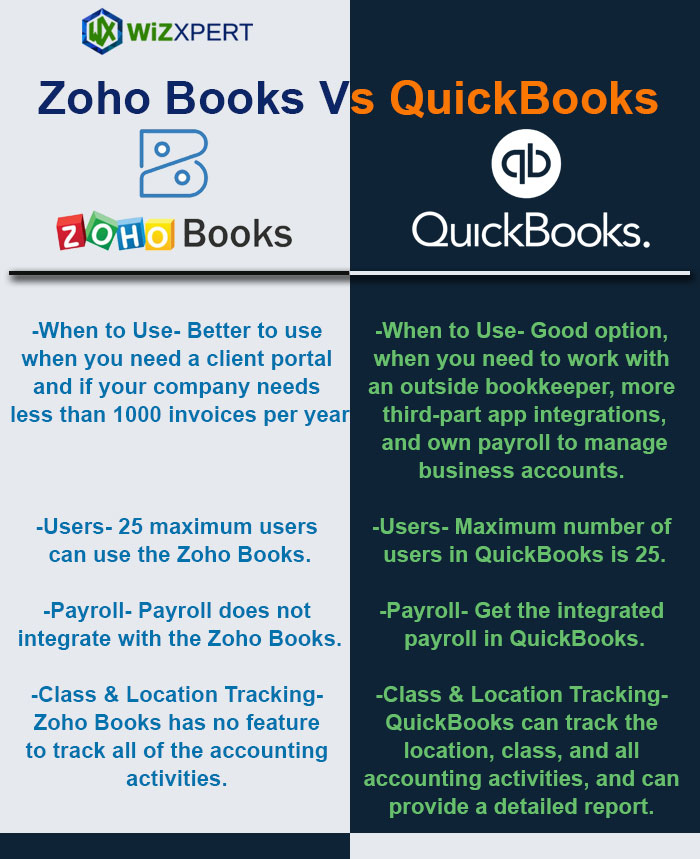
| Payroll Integration | Available in some regions, requires add-on. | Built-in payroll with tax filing services. |
| Mobile App Functionality | Full features, including invoicing and expenses. | Strong app with real-time sync and reports. |
Credit: fitsmallbusiness.com
Pricing Plans
Zoho Books offers three subscription tiers: Basic, Standard, and Professional. Pricing starts low, making it good for small businesses. QuickBooks also has multiple plans: Simple Start, Essentials, Plus, and Advanced. Each plan adds more features but costs more.
Both platforms may charge extra fees for add-ons like payroll or extra users. Zoho Books tends to be cheaper for add-ons. QuickBooks often charges more for added services.
| Feature | Zoho Books | QuickBooks |
|---|---|---|
| Free Trial | 14 days | 30 days |
| Demo Options | Available on request | Available online |
Both offer free trials to test their software. Zoho Books has a shorter free trial than QuickBooks. Demos help users understand the software before buying.
User Experience
Zoho Books has a clean and simple interface design. It uses soft colors and clear icons. QuickBooks offers a more detailed layout with many features visible on the main screen. Both are easy to read but differ in style.
Setting up Zoho Books is quick with a step-by-step guide. Users can connect bank accounts and import data easily. QuickBooks setup may take longer because of more options. It guides users but with extra steps.
| Feature | Zoho Books | QuickBooks |
|---|---|---|
| Customer Support | Offers email and live chat support. Response time is fast. | Provides phone, chat, and email support. More help options. |
| Help Resources | Has tutorials and FAQs for beginners. | Offers webinars and community forums for questions. |
Integration Capabilities
Zoho Books and QuickBooks both support many third-party apps. Zoho Books works well with tools like CRM, payroll, and email apps. QuickBooks has a larger app store, including inventory and time tracking apps. This helps users choose apps that fit their needs.
For bank and payment gateways, both software connect to many banks worldwide. Zoho Books supports popular gateways like PayPal, Stripe, and Razorpay. QuickBooks also links with these and more local banks, making payments easier.
API access allows custom work. Zoho Books offers a REST API for developers to build custom tools. QuickBooks has a robust API too, with many options for automation. Both help businesses connect their software to other systems.
Security And Compliance
Zoho Books and QuickBooks both use strong data protection measures. They encrypt data during storage and transfer. This helps keep your financial information safe from hackers. Both platforms require secure passwords and offer two-factor authentication for extra security.
Regulatory compliance is important. Zoho Books follows GDPR rules for data privacy. QuickBooks complies with SOX and PCI DSS standards. These rules ensure your data is handled legally and safely.
Backup and recovery options are reliable. Zoho Books stores data on cloud servers with automatic backups. QuickBooks also backs up data regularly to prevent loss. Both allow easy recovery if data is accidentally deleted or lost.
Credit: www.techrepublic.com
Suitability For Small Businesses
Zoho Books offers features for industries like retail, services, and manufacturing. QuickBooks supports a wider range, including construction and nonprofits. This helps businesses get tools that fit their work.
| Feature | Zoho Books | QuickBooks |
|---|---|---|
| Industry-specific Features | Good for common industries | Broader industry coverage |
| Scalability | Best for small to medium growth | Supports small to large businesses |
| User Limitations | Up to 10 users on most plans | Varies by plan, some allow unlimited users |
QuickBooks scales easily for larger teams. Zoho Books works well for smaller teams. Both offer simple tools to track users and roles.
Pros And Cons
Zoho Books Advantages: Easy to use with a clean interface. Offers strong automation for billing and invoicing. Affordable pricing fits small businesses well. Good mobile app for managing accounts on the go. Supports multiple currencies and tax settings.
Zoho Books Drawbacks: Limited payroll features compared to others. Some users find reporting options basic. Integrations with third-party apps are fewer. Customer support can be slow at times.
QuickBooks Advantages: Popular with many small to medium businesses. Powerful reporting and financial tools. Wide range of app integrations. Strong payroll and tax features included. Easy bank and credit card connections.
QuickBooks Drawbacks: Pricing can be high for small businesses. Interface may feel complex for beginners. Mobile app has limited functions. Customer service may be inconsistent in quality.
Credit: www.wizxpert.com
Frequently Asked Questions
What Are The Main Differences Between Zoho Books And Quickbooks?
Zoho Books offers strong automation and integration with Zoho apps. QuickBooks provides extensive third-party integrations and advanced reporting. Zoho Books suits small businesses; QuickBooks fits growing companies needing complex features.
Which Software Is Better For Small Business Accounting?
Zoho Books is ideal for small businesses with simple needs. It offers user-friendly invoicing and expense tracking. QuickBooks supports small to medium businesses with scalable features and robust payroll options.
How Do Zoho Books And Quickbooks Pricing Compare?
Zoho Books has affordable, tiered plans starting lower than QuickBooks. QuickBooks pricing is higher but includes more advanced tools. Both offer monthly and annual subscriptions with free trials.
Can I Integrate Zoho Books And Quickbooks With Other Apps?
Yes, both support integrations. Zoho Books integrates well with Zoho CRM and payment gateways. QuickBooks connects to numerous third-party apps like Shopify, PayPal, and Stripe for broader functionality.
Conclusion
Both Zoho Books and QuickBooks offer strong accounting features. Zoho Books suits small businesses with simple needs. QuickBooks fits those needing more advanced tools. Costs vary, so consider your budget carefully. User experience differs; test both before deciding. Choose the software that matches your business style.
A clear choice helps keep finances organized and stress-free. Take time to find the best fit for your goals.





