


Are you struggling to understand how visitors interact with your website? Imagine having a tool that reveals exactly what your audience wants, how they find you, and what keeps them coming back.
That’s where Analytics Google comes in. It’s more than just numbers—it’s a powerful way to unlock insights that can transform your online presence. Keep reading to discover how you can use Google Analytics to make smarter decisions and grow your business faster than ever before.
Google Analytics Basics
Google Analytics helps you understand website visitors. It shows how people find your site and what they do there. Learning the basics makes it easier to use this powerful tool.
You can track visitors, page views, and user behavior. This information helps improve your website and grow your business. Start with simple steps to get useful data fast.
Setting Up Your Account
Go to the Google Analytics website and sign in with your Google account. Click “Start measuring” to create a new account. Enter your website name and URL. Choose your industry category and reporting time zone. Finally, accept the terms of service. You will get a tracking code to add to your website. This code collects data about visitors.
Navigating The Dashboard
The dashboard shows an overview of your website data. It has different sections like Real-Time, Audience, Acquisition, and Behavior. Real-Time shows who is on your site right now. Audience tells you about visitors’ locations and devices. Acquisition shows how visitors found your website. Behavior reveals which pages they visit and how long they stay. Use the menu on the left to switch between reports.
Key Metrics To Track
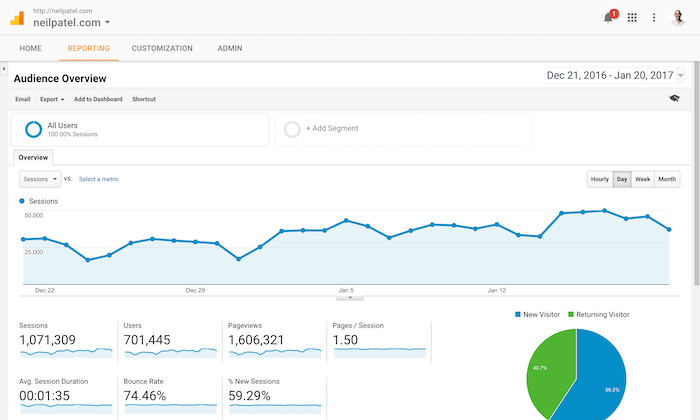
Focus on these important numbers. Sessions count how many visits your site gets. Users show how many people visit your website. Bounce Rate measures how many leave quickly without interacting. Average Session Duration tells how long visitors stay. Pages per Session show how many pages each visitor views. Tracking these metrics helps you understand visitor behavior and improve your site.
Data Collection Methods
Data collection is the foundation of Google Analytics. It gathers information about user actions on your website. This data helps you understand visitor behavior and improve your site’s performance. Google Analytics uses several methods to collect data effectively.
Tracking Code Implementation
The primary method to collect data is the tracking code. It is a small piece of JavaScript added to your website’s pages. This code sends visitor data to Google Analytics servers. Without it, no data will be recorded.
Place the tracking code in the header section of every page. This ensures all page views and user activity are tracked. The code loads every time a visitor opens a page.
Event Tracking
Event tracking records specific user actions beyond page views. These actions include clicks, downloads, video plays, and form submissions. You can set up custom events to track any interaction you want.
This method requires additional code snippets or tag manager configurations. Event tracking helps measure user engagement more precisely. It shows what visitors do, not just which pages they visit.
Goal And Conversion Setup
Goals measure important actions that align with your business needs. Examples include newsletter sign-ups, purchases, or contact form submissions. Setting up goals turns raw data into meaningful insights.
Conversions are counted when visitors complete these goals. This helps you evaluate marketing efforts and website effectiveness. Google Analytics allows you to create multiple goals for different objectives.
Audience Insights
Audience Insights in Google Analytics provide valuable data about website visitors. This data helps businesses understand who their users are. It shows details about their age, interests, and behavior. This knowledge improves marketing strategies and user experience.
Demographics And Interests
Google Analytics reveals the age and gender of your visitors. It also shows what topics interest them the most. Knowing this helps tailor content and ads to match user preferences. This focus increases engagement and visitor satisfaction.
Behavioral Patterns
This section tracks how users act on your site. It includes pages visited, time spent, and actions taken. Patterns reveal what content attracts attention and what does not. Understanding behavior guides site improvements and better content planning.
User Segmentation
User Segmentation divides visitors into groups based on similar traits. You can segment by location, device, or behavior. This allows for targeted marketing and personalized experiences. Segmentation boosts conversion rates by addressing specific user needs.

Credit: www.shopify.com
Traffic Sources
Understanding traffic sources is key to improving your website’s performance. Google Analytics helps you see where visitors come from. This data guides your marketing and content decisions. You can track different types of traffic. Each type shows unique visitor behavior and value.
Organic Vs Paid Traffic
Organic traffic comes from unpaid search results. Visitors find your site through search engines naturally. Paid traffic comes from ads you run online. These visitors click on your ads to visit your site. Organic traffic often shows long-term interest. Paid traffic can give quick, targeted visits. Watching both helps balance your marketing efforts.
Referral Analysis
Referral traffic shows visitors coming from other websites. These are links placed on other sites. Google Analytics shows which websites send the most visitors. This helps find strong partnerships and good content placements. It also reveals sites that drive low-quality traffic. Use this data to improve your link strategy and reach.
Campaign Tracking
Campaign tracking measures visitors from specific marketing campaigns. You add special tags to your campaign URLs. Google Analytics then reports on these tagged links. This shows which campaigns bring the most traffic and conversions. Tracking campaigns helps you spend your budget wisely. It also reveals what messaging works best for your audience.
Content Performance
Content performance shows how well your website content connects with visitors. It measures what works and what needs improvement. Google Analytics helps track this by giving clear data on user actions.
This data helps you focus on pages that attract users and keep them engaged. It also guides changes to boost your site's value and visitor satisfaction.
Top Performing Pages
Top performing pages are the most visited on your site. These pages get the highest traffic and hold user interest. Google Analytics lists these pages by views, time spent, and conversions.
Knowing your best pages helps you create similar content. It also shows what topics your audience prefers. This way, you can plan content that draws more visitors.
User Engagement Metrics
User engagement metrics include bounce rate, session duration, and pages per session. Bounce rate shows how many leave after one page. Session duration measures how long users stay. Pages per session count how many pages they visit.
High engagement means users find your content useful. Low engagement means you might need to improve your content or site design. These metrics help track user interest and behavior.
Content Optimization Tips
Use data to improve your content. Focus on clear headlines and easy reading. Break text into short paragraphs and use bullet points. Add images to make content more attractive.
Update old content to keep it fresh. Remove or fix pages with high bounce rates. Test different headlines and calls to action. These small changes can boost user engagement and rankings.
Credit: neilpatel.com
Conversion Tracking
Conversion tracking helps you see how visitors complete specific actions on your website. It shows which efforts bring results. This data guides better marketing decisions and boosts website performance.
Setting Up Goals
Goals measure important actions like sign-ups or downloads. Set clear goals in Google Analytics for tracking. Choose goal types like destination, duration, pages per session, or events. Goals give insight into user behavior and campaign success.
Funnel Visualization
Funnel visualization maps the steps visitors take to complete a goal. It shows where people drop off in the process. This helps find barriers and improve the user journey. Use this tool to optimize pages and increase conversions.
E-commerce Tracking
E-commerce tracking records sales data and revenue details. It tracks product performance, transaction numbers, and average order value. This feature helps understand customer buying habits. Use it to improve product listings and marketing strategies.
Advanced Analytics Features
Google Analytics offers advanced features that help you understand your website traffic deeply. These tools provide clear data that helps you make smart decisions. They show how visitors behave and what they like most on your site.
Using these features, you can create custom views of your data. You can also group visitors by behavior or traits. Plus, Google Analytics works well with other tools you use daily.
Custom Reports
Custom reports let you see data that matters most to you. You choose the metrics and dimensions to track. This way, you focus on what drives your business. Custom reports save time by showing key information quickly.
Audience Segments
Audience segments group users by shared traits or actions. For example, new visitors versus returning visitors. Or users who bought a product. Segments help you target marketing and improve user experience.
Integration With Other Tools
Google Analytics connects with tools like Google Ads and Search Console. This link gives you a full view of your marketing efforts. You can track ad performance and website traffic in one place. Integration simplifies your data analysis process.
Using Insights For Growth
Using insights from Google Analytics helps businesses grow by making smart choices. It shows clear data about visitors, actions, and trends. This knowledge guides actions that improve results and boost success.
Insights turn raw numbers into useful advice. They help spot strengths and fix weaknesses. Every business can use these details to improve marketing, user experience, and overall performance.
Data-driven Decision Making
Data guides each decision. It removes guesswork and focuses on facts. Google Analytics provides clear reports on visitor behavior and website performance. This information helps choose the best path forward.
Tracking user actions shows what works and what does not. Adjustments become precise and timely. Businesses save time and money by acting on real data.
Improving Marketing Strategies
Marketing improves with clear insight. Analytics reveals which campaigns bring visitors and sales. It shows where to invest and where to stop spending.
Understanding audience interests shapes better messages. Targeting the right people raises engagement and conversions. Analytics helps test ideas quickly and pick the best ones.
Enhancing User Experience
User experience grows with insight from data. Analytics shows how visitors navigate a site. It points out pages that cause confusion or drop-offs.
Fixing these issues keeps users happy and engaged. A smooth, easy website encourages visitors to stay longer and return. Analytics guides changes that make every visit better.
Credit: developers.google.com
Frequently Asked Questions
What Is Google Analytics Used For?
Google Analytics tracks and reports website traffic. It helps businesses understand user behavior. This data improves marketing and website performance.
How Do I Set Up Google Analytics?
Create a Google Analytics account, add your website, and install the tracking code. Verify the setup to start collecting data.
Can Google Analytics Track Mobile App Usage?
Yes, Google Analytics can track mobile app user interactions. It provides insights into app performance and user engagement.
Is Google Analytics Free To Use?
Google Analytics offers a free version with essential features. Paid versions provide advanced tools for large enterprises.
Conclusion
Google Analytics helps you understand your website visitors clearly. It shows which pages people like and how they behave. Use this data to improve your content and grow your audience. Tracking user actions helps you make smart decisions. It’s a useful tool for any website owner or marketer.
Keep checking your analytics regularly to see what works best. Small changes can lead to better results over time. Stay patient and use the insights wisely for steady growth.





